Appearance
Static Lib SARD Integration
Provided Integration Package
The integration package includes:
sardIntegration.lib– Live versionsardIntegration(log).lib– Logging/test versionsardIntegration.h– Header for calling SARD APIs
💡 Both
.libfiles are built with Visual Studio 2005 (WIN32,Runtime Library - MT).
Step-by-Step Integration Guide
1. Add the Header File
In Visual Studio:
- Go to:
Project > [yourproject name] Properties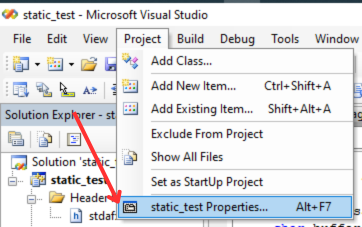
- Navigate to:
Configuration Properties > C/C++ > General > Additional Include Directories - Add the path to the folder containing
sardIntegration.h.
In your .cpp file, include:
cpp
#include "sardIntegration.h"2. Add the Static Library
In Visual Studio:
- Go to:
Project > [Project Name] Properties > Linker > General > Additional Library Directories - Set the path to the folder containing either:
sardIntegration.libsardIntegration(log).lib(for testing)
3. Initialize SARD
After linking the .lib and including the header, call sardInitialize() in your game project:
cpp
sardInitialize("path\\to\\armour.dll", "session_id");🛡️
armour.dllis downloaded automatically bySARDUpdater.exe(see Step 6).
Return Status Codes
1: SARD launcher not running2:armour.dllis invalid/modified3:armour.dllfailed to load4:sardInitializeaddress failed to get
📍 Call this early in your game's startup flow.
4. Fix Linker Error (Optional)
If you encounter:
text
LNK2001: unresolved external symbol __imp__PathFileExistsA@4It means PathFileExistsA from Windows is missing. Fix it by either:
- Adding this line in your code:
cpp
#pragma comment(lib, "Shlwapi.lib")- Or adding
Shlwapi.libin:Project Properties > Linker > Input > Additional Dependencies
Final Setup and Launch Instructions
5. Prepare the Runtime Folder
- Create a folder named
SARDnext to yourgame.exe. - Place
SARDUpdater.exeinside thatSARDfolder.
It handles downloading and managing SARD components.
6. Launch via Command Line
Open cmd.exe and run:
bash
cd C:\Users\user\GameName\SARD
.\your_game.exe [your_arguments]
Replace
your_game.exeand[your_arguments]with actual names/values.
Logging (Optional)
If you use sardIntegration(log).lib, a file named SARD_INTEGRATION_1.log will be created next to your game.exe for debugging and testing.